Category: Uncategorized

  • Bigger threat to your firm than ransomware

    Q: Ransomware extortion keeps making headlines. Are there bigger cybercrime threats to my small firm?

    A: Ransomware concerns us all. Yet, “business email compromise” (BEC) attacks represent a bigger, less publicized threat to small firms.

    You’re right about the headlines. Ransomware attacks on schools, hospitals, utilities, and governmental agencies generate a stream of scary stories. Those headlines may motivate us to pay extra attention to our file backups, antivirus protection, and other cyber defenses. That is all good.

    But where is the real danger coming from? Let’s compare losses—measured in actual dollar amounts—that resulted from BEC versus ransomware in the last three years:

    2020
    BEC: $1,867 million
    Ransomware: $29 million2021
    BEC: $2,396 million
    Ransomware: $49 million2022
    BEC: $2,742 million
    Ransomware: $34 million

    These statistics (from the Federal Bureau of Investigation Internet Crime Support 2022) show that BEC losses are roughly 50 times higher than ransomware losses. Clearly, ransomware damages are tiny in comparison to BEC, a growing profit center for cybercriminals.

    How does business email compromise work?

    BEC works by deceiving you, someone in your office, or your client into believing that a counterfeit email is an actual business email. The counterfeit email can trick the recipient into sending a wire transfer, making a purchase, paying an invoice—the number of subterfuges keeps growing.

    The email counterfeiting methods used by thieves range from basic to highly sophisticated:

    Sending an email from an email address with a subtle misspelling, such as substituting the number 1 or an uppercase “i” for the lowercase version of the letter “L.”

    Tricking people into revealing their email address and mailbox password and then taking over their email account, using it to send emails from the real account.

    Penetrating a local network through classic phishing techniques so that the intruder can take over email accounts.

    Using social engineering pretext stories on the phone to finagle access to a user’s email account.

    Bribing an employee of a mobile phone company to gain access to an executive’s phone, then using it to send fraudulent emails from the real account.

    While the losses to BEC are in the billions, don’t think that only big companies are targets. The median loss last year was about $50,000. While that amount won’t necessarily put you out of business, it is big enough to hurt a lot. The feeling of being seriously ripped off is not one that tends to disappear even years later.

    Antivirus services and training are not enough

    Sadly, antivirus services and security awareness training have not stemmed the rise of BEC. These are porous defenses. A subgenre of cybersecurity services has appeared to protect your firm’s email accounts. Examples include:

    CrimeBlocker: $5 per month or less per machine for small businesses and professionals, no minimum user count

    Ironscales: $6 to $8.33 per mailbox per month, minimums may apply.

    Avanan: for enterprises and managed service providers. Prices starting at $4.30 to $7.20 per user per month, minimum user count may apply.

    Some services require an involved setup process, establishing connections through an email gateway. Minimum mailbox counts can also be an obstacle to small firms. Be sure to ask a lot of questions when evaluating various services.

  • Back up your emails

    Q: How can I protect my personal emails from loss due to a data breach or a failure by my email service provider?

    A: You can protect your emails with software you purchase once or with a subscription to a cloud backup service.

    While most everyone backs up the files on their computers, it is unusual for people to back up their emails. After all, don’t Microsoft and Google back up everything more reliably than you can?

    Yes, but . . .

    Although Microsoft Outlook and Gmail emails are backed up multiple times by these big tech companies, you still can lose precious emails. How?

    1. You might accidentally delete an important email. Typically, all your deleted messages are permanently deleted by Microsoft or Google after 30 days.

    2. You might intentionally delete an email that, in hindsight, you wish you’d kept.

    3. You might “clean house” after being overwhelmed with years of emails. That can lead to: “If only I had that one old email!”

    4. Hackers could compromise your email account and delete everything in an effort to cover their tracks.

    5. Your provider could shut down your account for a suspected rules violation. How long will it take to fix that?

    6. Your account and all the backups could be accidentally deleted by Google or Microsoft. Think that couldn’t happen? It did to the retirement accounts of 647,000 UniSuper customers. Google accidentally deleted all their accounts and all Google’s backups.

    What if one of these failures happened to you, and you needed an old email? Maybe to prove that you actually did tell someone something or to find some vital information? That’s when you need your own email backups.

    Either a specialized software program or a cloud service subscription can continually back up all your emails.

    Email Backup Software

    After trying a number of programs, my favorite is Mail Backup X – Personal Edition, currently a $59 one-time purchase. Its license does not restrict you from using it for business accounts. This edition supports backups of up to five separate accounts, including:

    • Gmail and Google Workspace

    • Microsoft Outlook, Outlook.com, and Microsoft 365

    • Apple Mail

    • Microsoft Exchange

    • Mozilla Thunderbird, Yahoo, AOL

    • Any IMAP-based email service

    Mail Backup X costs more than the other software programs I have tried (see below), but I prefer it because of its options and lightning-fast search capabilities. When you have a large, old collection of emails in your backup, it is great to be able to run a flexible search and get fast results.

    Another important capability is backing up all emails older than a selected date and then removing them from your email account. Mail Backup X can do that.

    Below are other email backup programs I tried (but did not like as much as Mail Backup X):

    · Gmail Backup Tool ($29 one-time purchase). Backs up a Gmail account to many different email formats.

    · Safe PST Backup (free). Backs up only email in Outlook software installed on your computer, not Microsoft 365 emails.

    · SysTools Gmail Backup ($29 one-time purchase). Backs up Gmail to multiple formats.

    · SysTools Outlook.com Backup ($39 one-time purchase). Backs up Outlook.com to multiple formats.

    A downside of using email backup software is that backups are stored on your PC, where they are more vulnerable than backups stored in the cloud. You can protect your email backups by backing up their files to the cloud or a drive you keep offsite for safety.

    Email Backup Subscription Services

    Email backup subscriptions can back up your emails directly to the vendors’ cloud storage.

    · CloudAlly ($3 per month per mailbox). Backs up Microsoft 365 and Google Workspace.

    · BDRSuite (free). Backs up Google Workspace for up to ten users for free—forever.

    In a work setting, you have more to think about in terms of archiving and purging old emails. But for your personal emails, it is wise and inexpensive to back up everything.

  • Help others with digital estate planning

    Q: How can I help my friends and family with their digital estate planning? Though I’m no expert, my friends and family think of me as a “techie.” If, perish the thought, one of them were to die suddenly, the survivors could turn to me for help retrieving photos and vital records. What can I do now to minimize the potential problems for them and me?

    A: It is all too common for families to be overly burdened with trying to wind up the affairs of a deceased loved one. Sooner rather than later, help them prepare in advance. Assist them with these steps to ease the process.

    1. List on paper their usernames (often their email address), passwords, and two-factor identification method (also known as 2FA, frequently a cell phone number to which a one-time code will be sent) for each email account, financial account, computer, membership, and social media.

    2. Confirm that sensitive online personal and financial information is secured by strong passwords and 2FA.

    3. For each account that has 2FA, include recovery codes and methods in the list.

    4. Add to the list any unlock codes and emergency access methods for their phones and devices.

    5. Put paper copies of this list in two secure places, one at home and one elsewhere, such as a safe deposit box. Consider limiting who in the family has access to the secured lists.

    6. If they are savvy enough to have a password manager, list the location, username, password, and 2FA method for their password manager.

    7. For accounts with Google, Apple, and Microsoft, help them set up:

    a. Google Inactive Account Management

    b. Apple Legacy Contact

    c. Microsoft Account Recovery Code

    8. Ensure that they have two backups of important photos, videos, and records—at least one backup at home on an external drive or DVD discs and one backup in the cloud or on a drive in a safe deposit box or encrypted at a friend’s house.

    In the process of digital estate planning, each person needs to strike a balance. They need to protect their sensitive information from falling into the wrong hands of both outsiders and insiders, and they need to ensure that the right people have access after death.

    It’s hard enough to lose a relative or friend. Taking a few important precautions can simplify the necessary work for survivors who handle the winding up of a decedent’s digital life.

  • Protect yourself from infected links to PDF Files

    Clicking on links to PDF files in web search results or emails can infect your computer. You can take a number of steps to protect yourself.

    PDF files can contain malware that steals files, launches ransomware, and remotely controls computers. You can be tricked into opening a bad PDF by phishing emails (where email senders impersonate someone or some company you trust).

    Poisoned search results conceal a similar danger. Scammers are flooding the internet with fake websites offering free but infected downloadable PDF legal forms, pushing legitimate websites for downloadable forms further down in search results.

    How Can You Protect Yourself?

    A key answer is updates, updates, updates.

    Personally, I find software updates annoying. They interrupt, distract, and delay. Yet, they are necessary, even critical.

    Cybercriminals are finding and exploiting software flaws every day. They create new viruses as often as every 15 minutes. This allows them to bypass many antivirus programs, such as the free version of Microsoft Defender, which is updated only a few times per day.

    Your antivirus program must be regularly updated. Make sure yours is set to automatically update. I recommend using Webroot. It updates its cloud-based virus database continuously.

    Updating your other applications is also vital. Your web browsers—Google Chrome, Microsoft Edge, Firefox, Safari—really need their updates. Otherwise, their emerging vulnerabilities can be used against you. Browsers have their own built-in PDF viewers. If they are not up-to-date, malicious JavaScript can be run from infected web pages that take advantage of web browsers’ flaws.

    The list of important cybersecurity protections includes many other items, but the timely updating of software ranks right up near the top of the list.

  • How can you protect your business credit card?

    Are you concerned about the hassle of replacing my credit card or, worse, having to deal with a big fraudulent charge. How can you keep my credit card safe?

    Criminal gangs thrive on credit card fraud. Here are some tips for protecting your credit card.

    Your firm needs a primary credit card for business purposes. You use it to pay your major expenses for which credit cards are accepted. By limiting the number of companies that have your primary card information, you reduce your exposure to theft, fraud, and even the inconvenience of replacing that card due to a failed attempt by a thief.

    You might think, “Oh, it’s not so bad if someone rips off my credit card. The card company will give me the money back and I’ll just get a new number.”

    Two things are wrong with that thinking.

    First, your card company might not be so fast to reverse the fraudulent charge. Read about a reporter’s long ordeal with her credit card company trying to remove nearly $10,000 in fraudulent charges. The lessons from that story are to pay careful attention to any texts or emails from your credit card company and any notice that you will receive a new card in the mail.

    Second, it’s a hassle to go to the website of each or your vendors if your card number needs to be changed. Plus, if the timing is wrong, an automatic payment from your cancelled credit card could be declined, leading to more hassles.

    Protect Your Primary Credit Card and Checking Account

    Avoid carrying your primary credit card with you. Take it with you just for in-person, major credit card purchases and then store it safely. By choosing a primary card with a generous cash-back rate, you can receive a substantial amount of tax-free money over time.

    Don’t use your primary card for occasional online spending. Instead, use a secondary credit card or debit card for in-person purchases and ordering things online.

    Secondary Card

    Simply taking out a second credit card and using it for small and online purchases can protect your primary card.

    A debit card connected to a second checking account is another good option. It can protect your primary credit card and primary checking account. Use the second checking account only for debit card purchases. Ask if your bank will decline any purchases for more than the account balance. Get their assurance that their system can impose that restriction.

    Limit your exposure by keeping a low balance in this extra checking account. You can conveniently transfer money online from your primary checking account into the second checking account as needed.

    You might have lesser protection with a bank debit card than with a separate credit card, so ask about the bank’s policies.

  • Infections from surfing the internet

    Your computer could be infected just from surfing the internet.

    Ransomware criminals target legal professionals by poisoning search results on the web. Let’s say you search for useful forms using a legal term and click on a top-ranking search result. You risk downloading both the form and ransomware.

    Attacking Legal Organizations of All Sizes

    The Blackcat ransomware gang floods the Internet with malicious web pages and infected advertisements. They stuff their phony pages with 3.5 million occurrences of targeted search words and phrases. Most of them are legal terms.

    The gang effectively poisons legal search results. Their pages rank high in search engines such as Google. So, legal organizations of all sizes become targets, not just the big law firms that make the headlines.

    For example, clicking on a search result takes a legal professional to what appears to be a forum page. On the page is a download link offering a document relevant to the search term. Clicking that link triggers the malware Gootloader. It brings down a ZIP file containing a hidden JavaScript file. The hidden file launches ransomware or opens a back door to the computer.

    Targeting Legal Professionals

    Half of the Gootloader attacks strike the legal sector.

    Joe Stewart, a principal security researcher at eSentire, observed, “This [is] what I call a landmine approach. They’re just mining the entire web with these search keywords and just waiting for somebody in the legal profession, or somebody who needs this legal document, to just stumble on it and open it up. . . .”

    The vast majority of files dropped by Gootloader set off ransomware.

    Small Firm Risks

    Ilia Kolochenko, chief architect at ImmuniWeb, observed that law firms are often small, composed of one or two people, so they lack the cybersecurity knowledge of the larger firms. “Solo practitioners and small law firms are usually poorly protected, having very modest budgets for cybersecurity,” said Kolochenko.

    Protection Against Malicious Web Pages

    Antivirus companies do their best to keep up with the criminals, quarantining known bad files and blocking malicious programs based on behavior. You need antivirus protection to detect those known dangerous files and behaviors. But, sadly, the hackers keep winning. Large numbers of their continually altered files make it through antivirus services to cause harm.

    Cloudflare, a web performance and security company, advises, “remote browser isolation (RBI) technology . . . can automatically isolate suspicious email links to prevent users from being exposed to potentially malicious web content.”

    RBI integrated into web browsers offers the same protection against both infected search results and phishing emails. If you click on a bad link, whoa!, you see a warning screen and maybe an option to safely view a screenshot of the dangerous webpage.

    The features and pricing of RBI products vary. Researchers at the RBI companies are constantly updating and expanding their analytic technologies. They identify never-before-seen threats based on the techniques used by criminals to design their phony websites.

    Examples of RBI subscription services include:

    · CrimeBlocker, SecureMyFirm Inc., Minneapolis, Minnesota

    · Ericom Zerotrust Web Isolation, Ericom Solutions, Jerusalem, Israel

    · Zscaler Browser Isolation, Zscaler, Inc., San Jose, California

  • Cybersecurity Toolkit

    The Global Cyber Alliance is a nonprofit organization dedicated to making the Internet a safer place. The founding members are: Manhattan District Attorney’s Office, City of London Police, and The Center for Internet Security.

    The Alliance offers their Cybersecurity Toolkit for Small Business.

    Streamlined for small businesses, the Cybersecurity Toolkit gives practical advice and how-to’s you can follow to reduce your risks. You don’t need to be a technological whiz to use the tools. With cybercrime against small firms on the rise, it’s well worth your while to improve your protections.

    The Cybersecurity Toolkit offers these advantages:

    ·         Recommendations are less time-consuming than typical checklists and plans.

    ·         It covers good, free tools you can use right away.

    ·         The purpose of each tool is explained in brief, comprehensible language.

    ·         The toolkit website navigation is well organized, supporting step-by-step actions.

    ·         Each tool has an estimate of the time you’ll need to use it, typically 15 minutes.

    The tools are collected on a webpage divided into six main topics that expand into subtopics. This screenshot shows the third topic, Beyond Simple Passwords, expanded to show subtopics.

    An example of one of the tools recommended by GCA is Fing, an application that lists in inventory all the wired and wireless devices connected to your office network. The free version is ad-free with a good subset of the comprehensive features. An inventory of your devices is important so that you can keep them all protected with security releases and upgrades.

    A missing tool in the Cybersecurity Toolkit is one that lists all the software installed on your computers. Instead, it offers the same sort of Excel spreadsheet template that requires you to manually collect the installed software programs and list them in the spreadsheet rows. It estimates the required time at four hours. Forget about that!

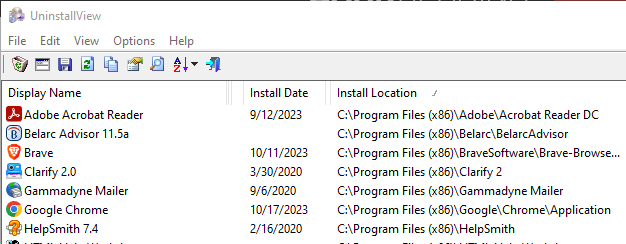
    Let me suggest a free software inventory program from a trusted source that identifies and lists your software for you. It requires no installation. Run UninstallView from Nirsoft.com on each PC to get a list of all the installed programs for each computer.

    UninstallView is designed to allow quick uninstallation of any application, but it serves very well as an inventory utility. To use it:

    1.      Copy three files out of the downloaded Zip file to a folder on the C: drive.

    2.      Double-click on UninstallView.exe.

    3.      Click on the column heading for Install Location to sort the programs by folder.

    4.      Review the programs in the C:Program Files (x86) and C:Program Files folders for any that should not be there.

    5.      You can uninstall unwanted programs easily, but be sure you know what you are doing so that you don’t break Microsoft Windows!

    You can seriously reduce your risks by implementing recommendations of the Cybersecurity Toolkit for Small Business. You would also be wise to work with a trusted cybersecurity expert who has small firm experience. Their work can be less involved and less expensive when you already have a good checklist and have many of the basics covered.

  • Stop mobile phishing

    If people in your office use their phones for business, you all need mobile protection.

    Basic protection – Android and Apple phones have basic security providing some protection. Both the Google Play Store and the Apple App Store screen for infected apps; however, they are not perfect. One benefit of adding mobile security apps to your phones to defend against infected apps. But there’s a more important benefit.

    More vulnerable – On your phone, you are likely more vulnerable to being tricked by clever phishing emails and websites. There is less text on the small screen, so it can be harder to notice that the source of a link is fraudulent. You also may be more distracted using your phone because you can be anywhere, not just sitting in front of a computer focused more on work.

    Good, free security apps – I did a deep dive into researching security apps for phones. The results:

    Bitdefender Mobile Security came out on top. If offers:

    • Free apps for Android and iPhone/iOS

    • Phishing protection – most accurate – free for iPhone, must pay for Android anti-phishing

    • Very low to no performance impact – some other apps slow your phone way down.

    • Detection of infected apps – matching Bitdefender’s excellent antivirus test results

    • Automatic scanning – when you install an app

    • Manual scans – run them if you’re concerned

    A note on Microsoft Defender apps: The free Microsoft app does not protect against phishing. For phishing protection from Microsoft, you would need a Microsoft 365 plan E5 costing $57.00 per user per month.

    Bitdefender Mobile Security is free in the Apple App Store and costs $14.99 per user first year and $24.99 per user second year. A better option for multiple phones is Bitdefender Total Security: 5 devices for $49.99 per user first year and $99.99 per user second year.

  • ScreenConnect Scam

    A small firm client just called to ask about a warning they had received from “ScreenConnect.” Screen Connect is not a company. It is a remote control product owned by ConnectWise and marketed to IT companies to provide customer support.

    ConnectWise offers a free, 30-day trial of ScreenConnect, which can be abused by scammer. They email you a warning that someone has connected to your computer from a suspicious location. Then they ask you to install ScreenConnect so that they can connect to your computer and “help” you resolve the fake problem.

    Your antivirus software won’t detect the installation as malware because ScreenConnect is commercial software with legitimate uses. It gives the fraudster access to everything on your computer and anything you can access on the web and your network.

    This sort of Tech Support Scam can be perpetrated by someone contacting you via email or phone with a supposed urgent problem. Urgency language is a classic indicator of a scam. It can trigger our fears, causing us to react without thinking clearly.

    Scammers use other free remote control services, too, such as:

    • AnyDesk

    • AnyViewer

    • AeroAdmin

    • Windows Remote Desktop

    • Chrome Remote Desktop

    If you receive an urgent message, be sure you double-check its source. Check on the source of the email. It should include the website name of the company. If you receive a phone call and have any doubts, ask for a call-back number, company name and website. Go to the real website (be sure it’s not a fake!), and call the number shown there.

    Scammers keep coming up with new ways and new messages crafted to fool us. Be careful!

  • Phishing attacks rank Number 1

    Over 300 thousand phishing attacks were reported to the FBI in 2022. The actual number of crimes caused by clicking on fake email links was far greater.