Welcome to WordPress. This is your first post. Edit or delete it, then start writing!
Category: Uncategorized
-
Windows 11 backups broken by bad Windows Update
A bug in the latest Windows 11 software update (KB5083769) has been causing problems that break some backups. If it stopped your backups, you can uninstall the update to get your backups running again properly.
The Windows Update bug does not affect Windows servers or Windows 10 computers. Only indows 11 machines running some backup applications are impacted.
Computer backups should be checked regularly, but for many of us it is hit or miss. Take the time now to check your automatic nightly backups to make sure they are working.
If your backups are working, great! The bug didn’t bite you. It was smart to check your backups anyway.
If your backups are failing
If your normal backup software is failing, it may be the fault of the April Windows Update bug.
As a stopgap to protect your valuable, recent files on your Windows 11 computer, simply copy or sync them to an external drive or cloud storage account. That can tide you over until your backups are working again.
Workaround for the broken Windows Update
Windows Update KB5083769, released on April 15, 2026, interferes with the Volume Shadow Service (VSS). VSS is used by many backup software programs to back up files that are in use. The Windows Update bug can prevent scheduled backups from working at all on any files.
If the Windows Update bug has broken your backups, you can get them working by:
-
Pausing automatic Windows Updates, and
-
Uninstalling Update KB5083769.
How to uninstall the bad Windows Update
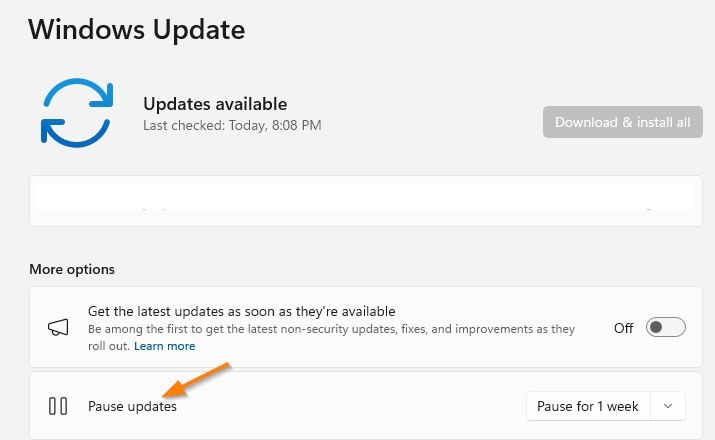
First, pause the Windows Updates before uninstalling Update KB5083769.
To uninstall Security update for Microsoft Windows (KB5083769), the steps are:
-
Save any open document and close all programs.
-
Go to: Settings > Windows Update > Update history > Related settings > Uninstall updates > Security Update for Microsoft Windows (KB5083769) > Uninstall
At the end of the uninstall process, choose Restart now to restart your computer.
When Microsoft announces a new Security Update that fixes the VSS bug in KB5083769, you can return to Windows Update and resume updates.
Illustrated step-by-steps to uninstall the bad Windows Update
Type: windows update in the Windows 11 Search box (bottom left of the desktop
Click: Pause updates
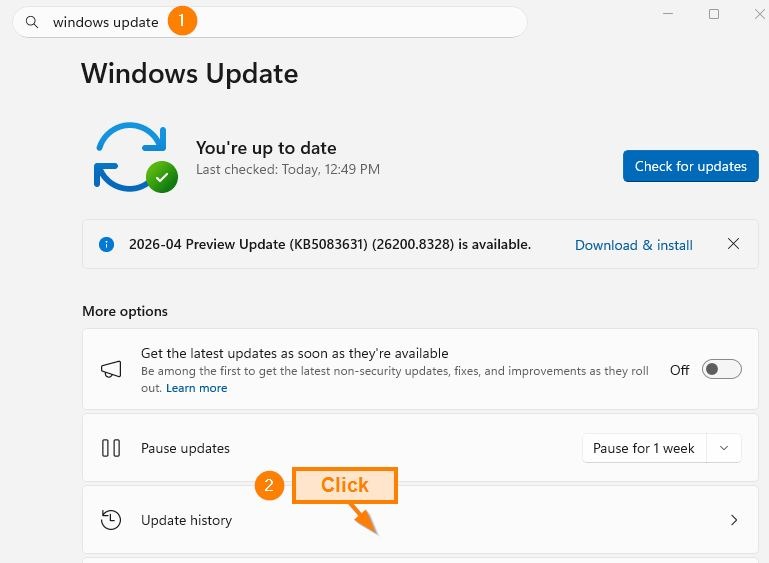
Click: Update history
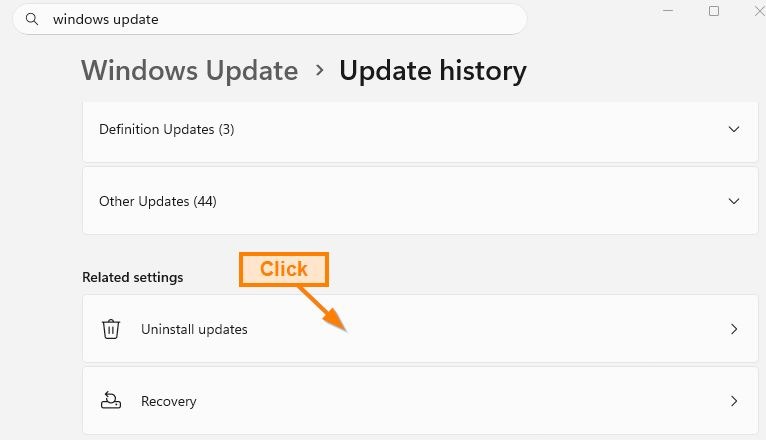
Click: Uninstall updates
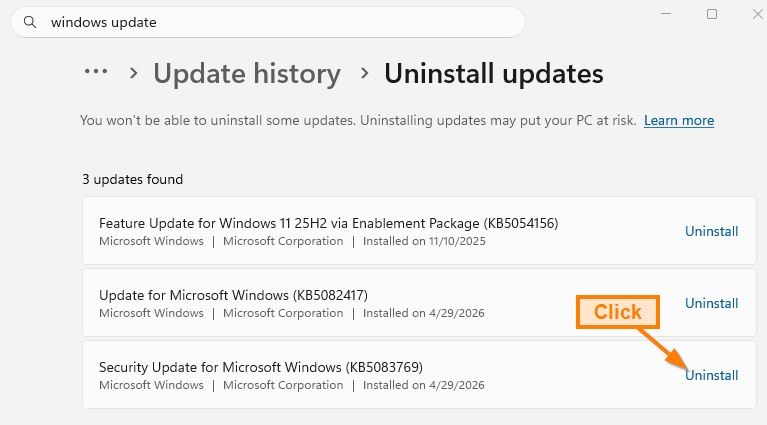
Across from KB5063769, click: Uninstall
Wait for the Uninstall process to complete and then restart the computer.
Questions? Let us know: info@securemyfirm.com
-
-
Has your router been hacked?
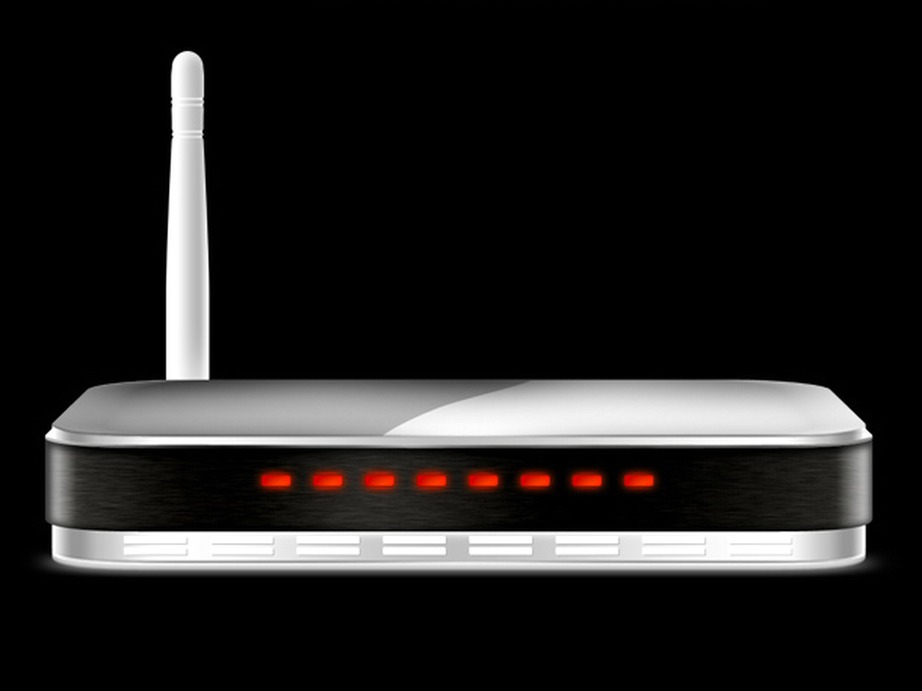
The FBI has named 18 more home router models that have been targeted in a malware attacks. They include models from:
-
D-Link
-
Netgear
-
TP-Link, and
-
Zyxel
Whether or not your router is on the list, it is important to keep it healthy. That means keeping it updated with the latest patches that plug security holes. But it is also important to check for signs that your router has been hacked.
Your router, which some might call a modem, stands between you and the entire, wild internet. If hackers get through your router, they could monitor everything you do. They could access your accounts, steal your identity, or encrypt all your files and demand a ransom payment.
Your antivirus software might protect you. Or it might not. Criminals are constantly coming up with new ways of defeating computer defenses. It is best to keep each of your layers of defense healthy.
Checking for signs of compromise in your router may be beyond what you’d like to do yourself. If that is your situation, you would be smart to engage a competent, trustworthy person or company to login and inspect your router.
You can see some telltale signs of a successful attack without logging into your router and navigating its endless menus:
-
Suddenly slow internet speeds
-
Unexpected disconnections
-
Devices going offline
-
Unexpected reboots
These are not sure signs of a successful router hack. MS Windows can flake out for various other reasons. But they can be warning signs that make checking your router a good idea.
Your router contains a wealth of information about its status. For access to the router, you’ll need its password, either for your use or to give to your technology expert.
The initial router password is typically printed on a label on the router itself. Older routers came with a generic, weak password. Newer routers have a stronger initial password. In both cases, the instructions advise changing the password, so you may need to find where that new password was saved during the initial setup of the router.
If you do not have the router password or cannot get it from the person who set it up, you face a lot of hassles. You will need to reset the router to its factory state. That will disconnect you from the internet. You may need to work with your Internet Service Provider to get the router reconfigured. Your technical expert will need to reset the settings on the router.
-
-
Password manager resistance
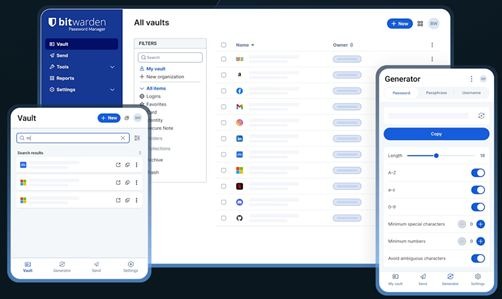
You use and love your password manager. Or at least you appreciate it. You know it keeps you safer.
But do you understand why many other people say, “No thanks,” when urged to use a password manager too?
Your attempt to convince your partner
Maybe you have asked your partner to switch to using Bitwarden. You are concerned about their risky password practices. You could be seriously affected if something goes wrong.
So you try to convince your partner with these arguments:
-
“It is so much safer!”
-
“You’ll save so much time.”
-
“All the experts say to use a password manager.”
-
“Look how easy it is to login anywhere!”
Unfortunately, you are not addressing their actual concerns, the reasons they aren’t using a password manager.
Most likely, you are more techie than the person you are trying to convince. You love techie time-savers and things that work automatically. Or you are rightfully concerned about cybersecurity. Sure, you may be frustrated getting used to new techie tools, but you forge ahead. You figure them out.
The other person’s perspective
The other person may see technology differently. They just want it to do what they want it to do. They would really like to avoid having to learn yet another technology. So many things could go wrong! If what they are already doing works for them, they’d really rather not change.
The non-techie person may face any number of worries:
-
“I’ll learn the steps but then I’ll forget some and be stuck.”
-
“I’ll look stupid if I get stuck and get stuck again.”
-
“I’ll really need to login to something and then the password manager will lock me out.”
-
“I’ll make a mistake and lose all my passwords. That doesn’t happen with my little paper password book.”
They may be reluctant to say any of those objections out loud. And they may minimize the actual risks of their current way of saving passwords.
They may say to themself:
-
“My passwords are good enough. No one will guess them.”
-
“No one cares enough about my stuff to try to break in. I’m not that famous.”
-
“If the place burns down, we’ll have bigger problems to worry about than my paper password sheet.”
When you push for them to use a password manager, you probably don’t address their actual concerns.
Password manager persuasion
You may offer to show them how fast and easy it is to use a password manager. From their perspective, saving a little time logging in is not worth all their imagined difficulties. They’re concerned about having to understand yet another techie tool and about failing and looking stupid.
What can you do to help a non-techie switch to using a password manager?
That is a really difficult question, especially if you are in a personal relationship. My best advice is to show that you really want to understand where they are coming from and how they feel about technologies in general. You could commiserate about the techie hassles we all experience in various ways. You might explain that you care about them and want to spare them from some really bad experiences.
Raise the possibility that, if they are up for it, you’ll set up a password manager for them and make it really easy to use. They will have a cheat sheet with illustrations showing them everything they’ll ever need to do. You’ll be understanding and helpful If they run into any snags.
Will it work?
Will that work? Maybe. Maybe not. If it does, you may be surprised at how appreciative they are once they get over the mental block about having to deal with a new techie thing.
If you have any tips on what has worked for you, please let me know!
Wells H. Anderson, 952.922.1120, info@securemyfirm.com
-
-
Why you need your own backup of cloud files

If you save files in Google Drive, Microsoft OneDrive, or another cloud drive, you need your own separate backup of those files.
Yes, the big tech companies run backups of customer files. But they are far from perfect. All of your cloud files could disappear in a flash.
How could you lose all your files stored by a major cloud company? Here are just two of many ways:
-
The cloud company could mistakenly identify a file in your account as illegal material relating to the abuse of children. Parents who saved entirely innocent photos of their kids have been hit by immediate account closures when pattern recognition technology generated false positives.
-
A single technical error by an imperfect (we are all imperfect!) engineer could delete all your files and all the company’s backups of your files. It happened to a large Australian business, UniSuper, in 2024.
The Australian pension fund manager, UniSuper, has over 600,000 members. The entire business was came to a near standstill for two weeks after all the files and backups for their cloud account were deleted by Google. Customers could not be served. Records could not be recorded in their systems.
Because UniSuper chose not to rely entirely on Google, they had a third-party backup of all their files. The recovery process was very time-consuming, but it got them back in business.
We offer automatic, independent backups of all your files, wherever they are. Let us know if you have questions about our file backup services and cyber security services.
-
-
Threat protection with DNS filtering – for free
Q: How can DNS filtering help to protect our PCs and laptops? We already have antivirus subscriptions.
A: DNS filtering adds protection beyond virus and malware detection by blocking connections to dangerous websites.
If you have a high-quality antivirus service, you have decent protection. But even the best antivirus technology fails to block all threats, especially new and newly obscured ones.
DNS filtering services track an extremely large number of malicious websites with new ones constantly added to their block lists. If you click on a deceptive, apparently innocent link to a bad website, a DNS filter can block it. A dangerous download can be halted before it gets anywhere near your computer.
Your Internet Service Provider, such as Comcast or Verizon, may do DNS filtering for you; however, a dedicated DNS filtering service can provide more extensive protection.
Free DNS filtering services include: Cloudflare 1.1.1.1, OpenDNS and Quad9.
DNSFilter and SafeDNS are available for $1 or $2 per month.
A downside of DNS filtering services is that they have the opportunity to track your browsing habits and mine what you look for. So you need to rely on the integrity and reputation of the service you choose.
If you use a Virtual Private Network (VPN) service, it may also offer DNS filtering. If it does not, you need to determine if you can configure your VPN service to work side-by-side with a DNS filtering service.
A DNS filtering service can add another valuable layer of protection at little or no cost.
-
The dangers of outdated Windows 10 software

Your old Windows® 10 software makes you vulnerable to cyberthreats. Cyber criminals have embraced powerful AI tools for breaking into your computers.
You can expect to see increasing news reports of more highly sophisticated cyber attacks that are developed and fired off faster and more often than in past years, focusing on Windows 10.
Your porous security layers
Your first lines of defense are your firewall and antivirus software. They are fundamentally important yet are incomplete and, standing alone, are porous.
The computer press runs stories on multiple successful cyber attacks every week. The vast majority of businesses small and large that fall prey to these attacks have both firewalls and antivirus protection. Alone, those defenses are not enough.
Plugging the security holes in your Windows operating system, web browser and other applications is your next line of defense. You plug those holes by applying the regular updates to Windows and other software.
Dangers of outdated Windows 10 software
Beginning on October 14, 2025, free security updates for Windows 10 ended. Your Windows 10 computers won’t receive any security updates unless you purchase a special, one-year subscription. Without those security patches, your Windows 10 computers vulnerable.
Cyber criminals are increasingly developing sophisticated attack methods. Exploiting new security holes, their drive-by downloads and infected links insert malware directly into your unpatched computers and smartphones.
An analysis of high (purple) and critical (orange) vulnerabilities reports on serious vulnerabilities discovered in Microsoft Windows 10. It also shows that the Linux operating system experienced a tiny fraction of the vulnerabilities in the same time period:
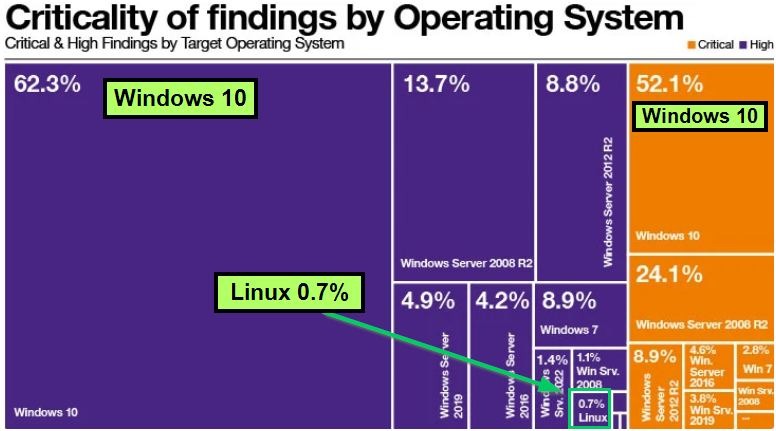
Microsoft’s November 2025 security updates fixed 63 flaws, including one actively exploited zero-day vulnerability. For your protection, you need to patch security holes in your Windows operating system, web browser, other applications and phones. If you don’t replace Windows 10, you can’t do that unless you have paid for one year of extended support. And then you will have to dump Windows 10 next year anyway..
Advanced defenses for cybersecurity
Cyber criminals regularly breach the standard computer defenses, steal files and lock up data. They make crushing demands for anonymous payments in crypto currency. Fortunately, additional layers of defense have been developed to block them.
CrimeBlocker specifically counters a range of threats that are triggered by clicking on links or opening deceptive, infected webpages.
Huntress Guard Dogs are your fail-safe guardians. If a cyber attack slips through your other defenses, the electronic Huntress Guard Dogs sniff out the threats by checking all the hidden corners of your computer systems for things that shouldn’t be there.
Recommendations
Your Windows 10 software, if left unprotected or outdated, exposes you to serious risks.
Recommendations: Upgrade to Windows® 11 or replace Windows® 10 with Linux. You will increase your protection against security holes that hackers are sure to exploit in Windows 10. Newer Windows 10 computers can be upgraded to Windows 11 for free. Many older computers cannot be upgraded due to the hardware requirements of Windows 11. For those computers, consider replacing them with new computers or replacing Windows 10 with Linux Mint for free. I will be publishing another blog on my positive experience installing Linux Mint on a 12-year-old, $599 Lenovo laptop.
Going a step further by adding advanced protections such as CrimeBlocker and Huntress Guard Dogs completes your layers of protection against cyber threats.
Know that protecting your precious information is an ongoing task. The development teams behind CrimeBlocker and Huntress Guard Dogs stay on top of the latest threats. Those threats keep evolving. So can your defenses, but you need to have the best ones in place.
*The prompt to generate the image was: Text: “Windows 10” with holes through the letters on a solid black background.
-
The Critical Role of Redundant Backups for Small Law Firms
The Importance of Multiple Backups
Your law firm handles an extensive amount of sensitive data, ranging from client information to privileged work product. For small law firms, protecting this data must be a top priority, one that often takes a back seat to more pressing problems involved in running a firm. Multiple, regularly tested backups need to be automatic. The reality is that any backup system may ultimately fail or simply stop functioning when needed the most, rendering your firm vulnerable to major data loss.
Why One Backup is Not Enough
Reliance on a single backup can lead to catastrophic consequences. For example, if a law firm experiences a cyber-attack or a hardware failure, a single backup could be destroyed right along with all the original documents and data, leaving the firm in a precarious position. Redundant backups serve as additional safeguards against disasters and even simple but heart-stopping errors. They add layers of protection, the Plan B for the failure of your main backup.
Financial Implications of Data Loss
The difficulty and expense of recovering from data losses cannot be overstated. Those losses dwarf the small expense of subscribing to an additional backup service.
When a law firm loses critical documents and data, the process of recovery can be both time-consuming and costly. Not only does the firm face the loss of fees due to disrupted operations, but it may also encounter reputational damage. The costs associated with data recovery can escalate rapidly, especially for documents and data that are irreplaceable.
Most small firms do not test their backups!. Testing is vital. Not only does it assure you that the backups are working properly, but also can identify potential failure points in the restore process before they become hidden issues.
Importance of multiple backups
The importance of adopting multiple backups cannot be overstated. These systems secure your critical data and maintain the continuity of your work for your clients. They protect your reputation in a workplace where you are almost entirely dependent on your computers systems.
Do you have questions about how you can protect your firm? Let us know. Send us an email…
-
Guarding Against Cyber Threats: A Call to Action for Attorneys

The Rising Threat of Cyber Attacks
Your firm is not just taking on client problems, you are also beset with an increasing number of cyber threats. Ransomware, worms, trojans, and viruses are more prevalent than ever, targeting law firms with the aim of accessing sensitive client data. Standard antivirus defenses fall short against these sophisticated attacks, making it crucial for legal professionals to pay greater attention to their cybersecurity.
Challenges of Standard Antivirus Solutions
Many attorneys believe that their traditional antivirus software is sufficient for protecting their data. However, the reality is that cybercriminals are constantly developing advanced techniques to bypass these defenses. Malware can infiltrate systems through seemingly innocuous email attachments or deceptive links, leaving firms vulnerable to disruptive data breaches. It is essential for legal professionals to recognize that standard antivirus software, while essential to block common pests, may provide a false sense of security. Antivirus technology often fails to detect or neutralize advanced threats.
CrimeBlocker and Huntress Guard Dogs
To combat these modern threats effectively, we recommend subscribing to specialized services: CrimeBlocker and Huntress Guard Dogs. These solutions offer advanced protection that goes beyond traditional antivirus measures. CrimeBlocker actively monitors for deceptive emails and webpages, helping to prevent ransomware attacks before they can cause damage. On the other hand, Huntress Guard Dogs diligently hunt down any existing threats that might have slipped through the cracks, providing peace of mind as you handle sensitive information.
By adopting these advanced protection systems, legal firms can safeguard their operations against the growing tide of cybersecurity threats. Don’t wait until it’s too late—invest in your firm’s security today. Learn more about our offerings by visiting our pages for CrimeBlocker and Huntress Guard Dogs.
With the right defenses in place, you can focus on what you do best: serving your clients and ensuring justice. Take action now to protect your firm from becoming the next victim of cybercrime.
-
Company of eight employees collapses due to ransomware

Paying the roughly $800,000 ransom didn’t kill the company. What did it was the disruption of their business for months on end even after unlocking their files.
Wilhelm Einhaus, founder of Einhaus Group, recalls the “horror day” in 2023 clearly: “I came to the company in the morning and there was a printout on every printer: We hacked you.”
Their contract, billing and communication systems were all down. Royal ransomware had encrypted everything. They had to resort to manually processing a large backlog of transactions.
The ransomware was able to steal administrator credentials, allowing it to spread undetected across the firm’s network, locking up multiple servers and PCs. The firm did not have the type of cybersecurity system to detect these threats and isolate the first affected server.
In the ensuing months, they cut staff and sold off assets to try to stay afloat. It wasn’t enough. After two years, the company filed for bankruptcy.
Managed Detection and Response (MDR) services are designed to identify precisely this type of behavior, the type that antivirus software does not detect.
The cost of MDR service, Huntress, from SecureMyFirm: $10 per computer per month before any discounts. Compare that to the approximately $5,000,000 loss and eventual bankruptcy sustained by the Einhaus Group.