Author: admin@securemyfirm.com

  • Sneaky ransomware attack

    The new Mamona ransomware can get past your antivirus software and other defenses in all probability. When that happens, all your files will be locked up. Your business grinds to a sudden halt.

    How does Mamona do that? It gets past your antivirus protection because, unlike all other ransomware, it never “phones home.” That is very unusual behavior.

    Mamona poses a particular threat to small firms because it is typically used by small-time cyber criminals. They purchase this commodity ransomware anonymously and choose their own victims. That approach differs from big ransomware gangs that target large businesses and use coordinated departments for breaching, infecting, reconnoitering and negotiating in the course of their ransomware attacks.

    Small-time cybercriminals are much more likely to go after smaller targets seeking quick ransom pay-offs. With Mamona they have a threat that uses new methods to avoid detection. Standard antivirus software common in small businesses is no match for it.

    Good news about Mamona ransomware

    If unfortunately you become a victim of a Mamona attack, There is some excellent news. While good news is good, bear in mind that ransomware continually adapts and spawns new variants. If you are struck by an never-before-seen Mamona variant, none of the news may be good.

    First good news: Mamona claims in its ransomware message on your computer that it has stolen your files and will expose them. It cannot do that. The threat is empty because it cannot “phone home” and transfer your files. All it can do is lock up your files with encryption. If you have good backups, you likely can recover rather quickly without paying a ransom.

    Second good news: Mamona’s encryption is weak. A decrypter has already been created to unlock your files. Currently there is no free decrypter. The companies now offering Mamona decrypters require a payment and you cannot be sure they will be effective.

    If you are hit by Mamona, I recommend checking the best free decrypter sources first:

    If those sources do not have a Mamona decrypter, contact the first company to publish about the Mamona threat, ANY.RUN

    Third good news: Mamona is not “slow ransomware,” which lies in wait, encrypting small batches of files each day for months. That tactic fills your backups with encrypted files making full recovery difficult or impossible. Mamona strikes immediately. That means your most recent backup likely is a good one, unless your backups are exposed. For example, if your backups are on a USB drive or an active network share, ransomware can lock all of them up along with your other files.

    Here at SecureMyFirm Inc., we want you to be safe. We offer ransomware-proof cloud backups. We also protect you with special layers of defense that catch attacks missed by your antivirus software. Send us a message to get started with superior protection.

  • Break the old password rules

    Old rules:
    1. Use uppercase and lowercase.

    2. Include numbers.

    3. Include punctuation.

    4. Don’t use dictionary words.

    5. Make it at least 8 characters long.

    6. Don’t use personal information, like your birthdate.

    7. Create a password with a random password generator.

    New simpler, safer rules

    The National Institute of Standards and Technology (NIST) has issued new, simpler rules:

    1. Use 15 or more characters.* They can be just letters. You can use multiple words.

    2. Don’t use a password that appears in a breached password list.

    Why the change?

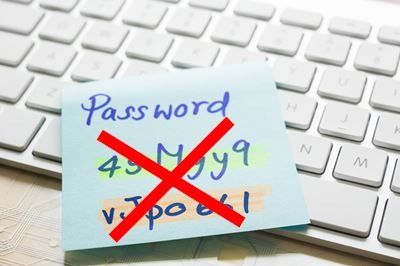
    Passwords like “45Mgy9-vJpo661” are strong, but hard to memorize. So you are apt write them down in places where they are easily discovered. A password like this is much safer: yellowoverviewhilltop.

    It breaks old rules 1, 2, 3, 4 and 7. NIST has thrown out those rules. You can, too!

    The 21-character password, “yellowoverviewhilltop” is 128 times stronger the randomly-generated 14-character password, 45Mgy9-vJpo661, despite its mix of numbers, letters and punctuation. And, by associating it in your mind with a made-up picture, one like “yellowoverviewhilltop” is much easier to memorize. For example, you could visualize viewing a yellow field from a lookout spot on a hilltop.

    A three-word password is so memorable, with the help of a mental picture, that you don’t need to have it instantly available. You can afford to write it down on a couple of pieces of paper and stash them in very secure places. If you forget your password, it will take you more time to retrieve it, but that shouldn’t happen often with an easy-to-memorize password.

    With the old password rules, too many people relied on being able to quickly refer to written-down passwords close at hand.

    What about password managers?

    Password managers are wonderful! You can not only save and use many, longer passwords safely, you can also fill them into websites without having to type them over and over. Yet with a password manager, you still need a single password that you have immediately available, either in your mind or at hand.

    So for your main, password manager password, follow the two new rules:

    1. 15 or more characters.*

    2. Not a password that appears in a breach list.

    How do you know if your password is not on a breach list? That’s easy.

    Password breach list

    The website, https://haveibeenpwned.com lets you enter a password to see if it has appeared in any password breaches. Experts will tell you to never test your password on some webpage. It is true that the owner could collect anything you enter. However, Have I Been Pwned has a long, solid reputation. In any event, the chances are negligible that your three-word password created from random words is already on a breach list.

    Three-Word Password Generators

    xkpassword will generate three-word passwords with many optional variations to make them (unnecessarily) stronger. Here are examples it just created:

    • WorkersSeedsSettled

    • FatherPlanExactly

    • NeedleAdvanceFraction

    • DecidedCityWomen

    • StartIndustryForever

    • MontanaGrewFactories

    You don’t need to use the uppercase letters. They make it easier to read but fussier to type, especially on a phone.

    The generator I use is built into BitWarden, my password manager.

    Next Steps

    At a minimum, inspect your most important passwords and replace them. Any password that uses a single dictionary word plus a number or punctuation needs to go. That is true even if you use “clever” letter substitutions like H0rs3s!

    Better yet, download a free password manager such as BitWarden and spend a little time moving all your passwords into it, changing the ones that don’t yet follow the two new rules.

    * The actual NIST standard is “a minimum of 8 characters” and should require “a minimum of 15 characters.” I have used 15 because 8 is just too short these days!

  • Top 10 cyber threats to small businesses in 2025

    1. High Prevalence of Cyber Breaches: Nearly half (46%) of all cyber breaches impact businesses with fewer than 1,000 employees.

    2. Targeted Cyberattacks: A significant majority (61%) of small and medium-sized businesses (SMBs) were targeted by cyberattacks in 2021.

    3. Ransomware Vulnerability: A staggering 82% of ransomware attacks in 2021 were directed at companies with fewer than 1,000 employees.

    4. Social Engineering Attacks: Employees of small businesses experience 350% more social engineering attacks than those at larger enterprises.

    5. Insufficient Cybersecurity Measures: A concerning 51% of small businesses lack any cybersecurity measures at all.

    6. Ransomware Payments: Over half (51%) of small businesses that fall victim to ransomware end up paying the ransom.

    7. Cyber Insurance Gap: Only a small fraction (17%) of small businesses have cyber insurance, leaving many vulnerable to financial losses from cyber incidents.

    8. Data Loss: Nearly 40% of small businesses reported losing crucial data as a result of a cyberattack.

    9. Low Cybersecurity Budget: A significant portion (47%) of businesses with fewer than 50 employees have no cybersecurity budget, highlighting a critical gap in preparedness.

    10. Multi-Factor Authentication (MFA) Gap: A mere 20% of small businesses have implemented multi-factor authentication, a crucial security measure to prevent unauthorized access.

    Source: StrongDM

  • Are you using a fake browser?

    Browser-in-the-Middle (BitM) attacks have become commonplace, unfortunately. Your typical antivirus software and firewall cannot stop them. Here’s what they do to you and what you can do about it.

    You can be attacked by a BitM simply by opening a webpage in your search results or by opening an email and being fooled. That happens to thousands of people every day.

    Once you have opened an apparently innocent webpage, the gang member’s code inserts a transparent browser between you and the internet. You see nothing abnormal. There is no suspicious lag or flash on your screen. You open more, real pages and they behave normally.

    The transparent browser lodged between you and the pages you visit is sending every keystroke, every page, all your tokens (keys to opening secure pages such as your bank account) back to the criminal. They even get around your Multi-Factor Authentication (MFA or 2FA).

    If you are not properly protected, you find out about the attack in very unpleasant ways. Your email account may be compromised so the attacker can send highly deceptive phishing emails to all the people appearing in your email account or contact list. They will let you know! Or you may find your bank balance has suddenly dropped. Not fun.

    What can you do about BitM?

    A great defense is Remote Browser Isolation (RBI). Fight one browser acronym, BitM, with another, RBI. Your RBI service checks out every link or page before you open it. It happens so fast you don’t notice the protection. But a lot happens at the RBI server. It neutralizes the threat well before the attacking program can send anything to your computer.

    We offer offer CrimeBlocker to protect from BitM and a host of other threats. Read about how CrimeBlocker makes you safer here.

  • Critical update to 7-zip program

    When you download a file from the internet or extract a file from a downloaded Zip file, Microsoft Windows checks it for safety. A new trick devised by hackers bypasses this safety check if you don’t use the current version of 7-zip,

    A critical update for 7-zip is available here: https://www.7-zip.org/download.html

    If you use 7-zip, be sure to download and run the latest 7-zip installer.

  • Phishing stories

    Phishing Definition

    Phishing is a form of social engineering and a scam where attackers deceive people into revealing sensitive information or installing malware such as viruses, worms, adware, or ransomware. Phishing attacks have become increasingly sophisticated and often transparently mirror the site being targeted. – Wikipedia

    Phishing stories

    The following phishing stories are taken directly from social media posts by computer professionals. Some describe phishing test emails that people fell for. Others are real phishing emails that caught people.

    • We had just changed payroll companies from ADP to something else. So they sent a Phish that looked like it was coming from ADP stating that we needed to login through the link to verify our account closures or something like that. Made perfect sense at the time and nearly everyone fell for it.

    • I received a well crafted email about how a customer didn’t recognise a transaction from my company on their credit card statement, and they were going to file a dispute with their bank etc (Super bad for us)…. I didn’t fall for it, however i can see many other business owners easily falling for it.

    • I did one [test] that was a fake OneDrive email. I made it look like it came from a C-level whose last name was Martin, but I spelled it Martian. Got a bunch of people with that one. He’s a good sport, and I had his okay beforehand. He found it hilarious until so many people fell for it.

    • There was one [test] i made that had the highest click rate was a link for a lunch order from a misspelt company domain. Ive tried complex designs trying to leverage urgency and authority that i put a lot of effort into but the one that had the highest hit rate was basically “(made up name) is retiring, click here for free lunch”

    • We did a “holiday bonus” gift card [test email]. Got about 50% [of employees to click on it].

    • Highest click-rate test (and highest amount of people @$%?#! pissed) the team conducted was a “Work from home policy changing. Now 3 days in office! Click through to find out more!”

    Cyber criminals are constantly devising new, compelling messages to cause you and those you work with to click on links in phishing emails and fake websites. So spread the word about phishing!

    For electronic defenses against phishing and other threats, check out our affordable cybersecurity subscriptions: CrimeBlocker, Huntress Guard Dogs, and MultiShields Backup.

  • Restore your computer in the cloud

    Understanding Cloud Backup of Your Computer

    A sudden computer failure stops your work immediately. Replacing your computer can take days. Then all your software and settings need to be installed and configured. That means more delays.

    You can be back up and working much, much faster. A cloud backup service protects your files. The right one could also restore your entire computer on a private cloud server. So you can get back to work from any computer anywhere.

    With an advanced cloud backup service, you can ensure that you have a reliable, available safety net.

    When would you need restore your computer in the cloud?

    Computers fail. Their components malfunction. Electrical spikes can zap them. Microsoft Windows can crash with no chance for recovery. Viruses can strike. Not to mention fires, lightning, storms, floods, earthquakes and theft that put your computer irrecoverably out of action.

    You can take two important steps to get back to normal:

    1. Start the process of getting a replacement computer. That can take days and then there is reinstalling everything you need on it, so get that process started.. You really can’t appreciate how long that takes and how disrupting it is unless you have experienced it.

    2. With the right backup service, you can have the entire contents of your computer restored in the cloud. Start that by contacting your backup service provider.

    The good news in a computer crisis is that your insurance may cover the loss. With a cloud backup and restore service, you can have your own “loaner car” equivalent of your computer. But that needs to be set up ahead of time.

    Setting Up Your Cloud Backup Service

    Your backup service provider can do the heavy lifting. They will configure your backups to restore to a cloud server. Essentials for your backups include:

    • Drive image backup

    • Automatic nightly incremental backups

    • Backup format compatible with the cloud server

    • A standby cloud account with a virtual machine

    Most backup services protect only your files, not your entire computer. And most full drive image backups are only set up to restore to a physical computer, not to the cloud. To get back up and running as soon as possible, ask for a setup that restores your computer to the cloud.

    With the rapid development of cloud computing, you can now rent a decent cloud computer for a few dollars per day. Pay only a low monthly standby fee for the option. When you need it, pay the daily rate for just the days you use. The trick is to be ready in advance for a computer emergency.

    Let us know if you are interested in your own “loaner car” cloud computer option.

  • Dangerous increase in bad, effective emails

    Cyber criminals are sending more sophisticated phishing emails, crafting them to appear very real, not full of typos and bad formatting. They are targeting businesses with Business Email Compromise (BEC) messages that trigger a sense of urgency. In 2024, BEC increased 29%.

    The thieves use a variety of techniques to trigger a response that leads to a financial rip-off:

    • Purchase scam – An urgent request to purchase an item needed right away

    • Renewal scam – Threatens immediate cut-off of a vital service

    • Funds transfer scam – A time-sensitive request to transfer money to a firm bank account

    • Fake invoice – Request for a payment of a routine invoice

    • Gift card scam – “Partner’s” request for cards as gifts to employees

    Business Email Compromise messages may be sent after hours or on weekends when the recipient is less likely to disturb the apparent sender for confirmation.

    Funds transfer scams can be especially damaging. They may involve a request for a wire transfer need as part of a settlement or business deal. People at all levels within organizations have been deceived by these scams.

    Cyber criminals can devise especially convincing fake emails using information obtained from cracking into the email accounts of employees. They use specific names of a firm’s clients and the correct name of the firm’s bank in composing a persuasive message.

    Training your co-workers to recognize BEC can reduce the threat. Protective layers or cyber security, such as CrimeBlocker, can block the infected links in BEC emails.

  • You need passwords of 12+ characters

    The old guideline for passwords was: 8 characters with mixed-case letters and numbers.
    Our recommendation is:
    12 or more characters with mixed-case letters and numbers.
    Why do you need these longer passwords?
    Commercial companies specializing in password recovery can easily discover your 8-character passwords. For example, Secureworks can guess 1.4 trillion passwords per second.

    At that rate, they can guess your 8-character password in about 2.5 minutes!

    Amateur hackers are not far behind the big companies. They build their own super-strong password cracking computer networks or they rent time on extremely powerful virtual computers hosted by Amazon, Google or Microsoft.

    It can be daunting to try to replace all your account passwords in one sitting. So pace yourself. Update a few passwords each day to 12 or more characters. While you are at it, download a free password manager such as Bitwarden. It makes it much easier to safely store and use your longer passwords.

    Your password manager can fill in passwords online very easily so you don’t have to type them.

  • Send a password securely

    Q: How do I send a password securely via email?

    A: You can email a secret link for a single-use webpage that will display a password.

    It is a bad idea to send passwords and other confidential information via normal email.

    It is unlikely, but possible, for a sensitive email to be intercepted by a bad actor in its journey across the internet. Another risk is that an attacker could break into your email account or the recipient’s email account. If a bad actor were to open your email, they could misuse its contents.

    Secure email services can be excellent, but they can also be complicated and require setup in advance. If you just need to send a password, you have other options.

    Simple, safe solution for sending passwords

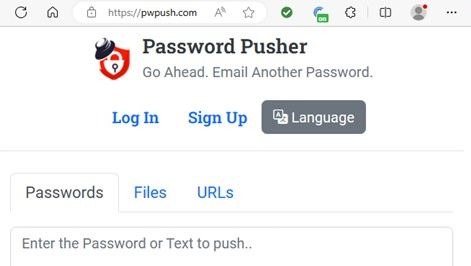
    My favorite free service is Password Pusher (www.pwpush.com).

    You don’t need to sign up for an account. Using it is easy:

    1. Go to https://pwpush.com

    2. Enter a password you want to send.

    3. Slide the Views slider down from 5 views to 1.

    4. Click Push It!

    5. Copy the secret link.

    6. Paste the secret link into an email and send it.

    When the recipient receives the email, they can click the secret link, copy the password, and keep it in a safe place.

    The reason you set the views to 1 is so that no one else can get the password using the link. It expires immediately after the recipient opens it. So, if the recipient can open the link, you can be sure no one else has seen the password.

    But what if someone intercepts the email before the recipient sees it? The interceptor can get the password using the secret link. That could be a problem if the bad actor knows how to use the password.

    You have a couple of options for avoiding the risk of interception, small as it may be.

    1. Send the password before you use it to lock up something, such as an encrypted Word document, PDF file or Zip file. Ask the recipient to confirm that they have clicked the secret link and have the password. If a bad actor got to the password first, your recipient won’t be able to open the secret link. You’ll know that you have to create a new password and secret link. After the recipient confirms receipt of the new password, use it to lock what you want to send and then send it.

    2. To send an existing password, you can first send a temporary password via a secret link. Once the recipient confirms receipt of the temporary password, you can send a new secret link for the real password, locking the link with the temporary password. Password Pusher has an option to secure a secret link with a password.

    This whole process is secure because you set the secret link to allow only one view. If the recipient cannot view a password you sent via Password Pusher, you know that someone else got it first.

    Alternative to Password Pusher

    An alternative to Password Pusher is One Time Secret (www.onetimesecret.com). It works very much like Password Pusher except that you cannot copy and paste the password shown by the secret link. You need to type it or write it down.

    Both services are free. You need to trust that the creators are telling the truth when they assert that they have no access to the passwords you send. Password Pusher publishes their source code allowing experts to confirm that it is secure; however, as Password Pusher, notes you cannot be certain that the server-side code of any website is or does what the website claims.

    Neither service collects personal information or asks for an email address. You simply make an entry in a form, click a button, and get an expiring secret link.